Hero section for Lumiq.

Floyka Design Studio is a Web3‑focused creative agency that has delivered end‑to‑end desig; brand identity, UI/UX, 3D modeling, VFX, event visuals, and no‑code web solution; to dozens of startups, communities, and large‑scale events. Fully integrated with bloc
Design feedback inside Framer can get messy fast.
A note lives in one place, a checklist in another, and small handoff details often get lost between comments, chats, and task tools.
So I built Canvas Notes.
It lets you attach notes directly to layers, keep feedback tied to the right element, and turn scattered comments into clear action items with statuses like To Do, In Progress, Later, and Done.
You can add checklists, track edits, filter notes by page or type, and move through everything in Review Mode without losing context.
Built for designers, collaborators, and handoff workflows that need more structure inside Framer without adding another heavy tool.
You can find it on the Framer Marketplace by searching Canvas Notes.

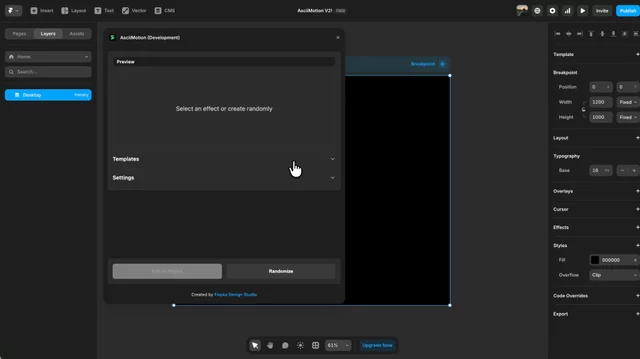
ASCII visuals look great on websites, but they are usually not easy to build or control inside Framer.
That’s why I made AsciiMotion.
It lets you create and customize animated ASCII effects directly in Framer with real-time controls, ready-made styles, and one-click setup.
Built for designers, creative developers, and anyone who wants to make a Framer site feel more experimental.
You can find it on the Framer Marketplace by searching AsciiMotion.
Why is moving saved styles between two Framer projects still mostly a manual job?
Recreating the same colors and text styles is manageable once. Doing it across every client or internal project gets old quickly.
Style Transfer scans saved color and text styles, turns them into a reusable package, and lets you apply that package in another Framer project. You can also save packages to your library or export them as JSON.
You can try it here:
https://www.framer.com/community/marketplace/plugins/style-transfer/
SEO issues are easy to miss when a Framer site starts growing beyond a few pages.
A missing H1 here, an unreadable URL there, or a forgotten meta description usually only becomes visible right before launch.
I built SEO Boost to scan every published page and turn those problems into a prioritized list instead of another generic SEO checklist.
The free plan includes one complete scan, so you can see what it finds before deciding whether you need more.
https://www.framer.com/community/marketplace/plugins/seo-boost/
I built Component Usage Analyzer because I kept running into the same issue in Framer projects.
After a while, it gets hard to tell which components are still being used, which ones are safe to clean up, and whether duplicate definitions are starting to appear.
This plugin scans your project and gives you a quick overview of active components, unused components, possible duplicates, and page-level usage.
It helped me make cleanup and refactoring decisions with more confidence.
You can try it here:
https://www.framer.com/community/marketplace/plugins/component-usage-analyzer/