About Before After Counter
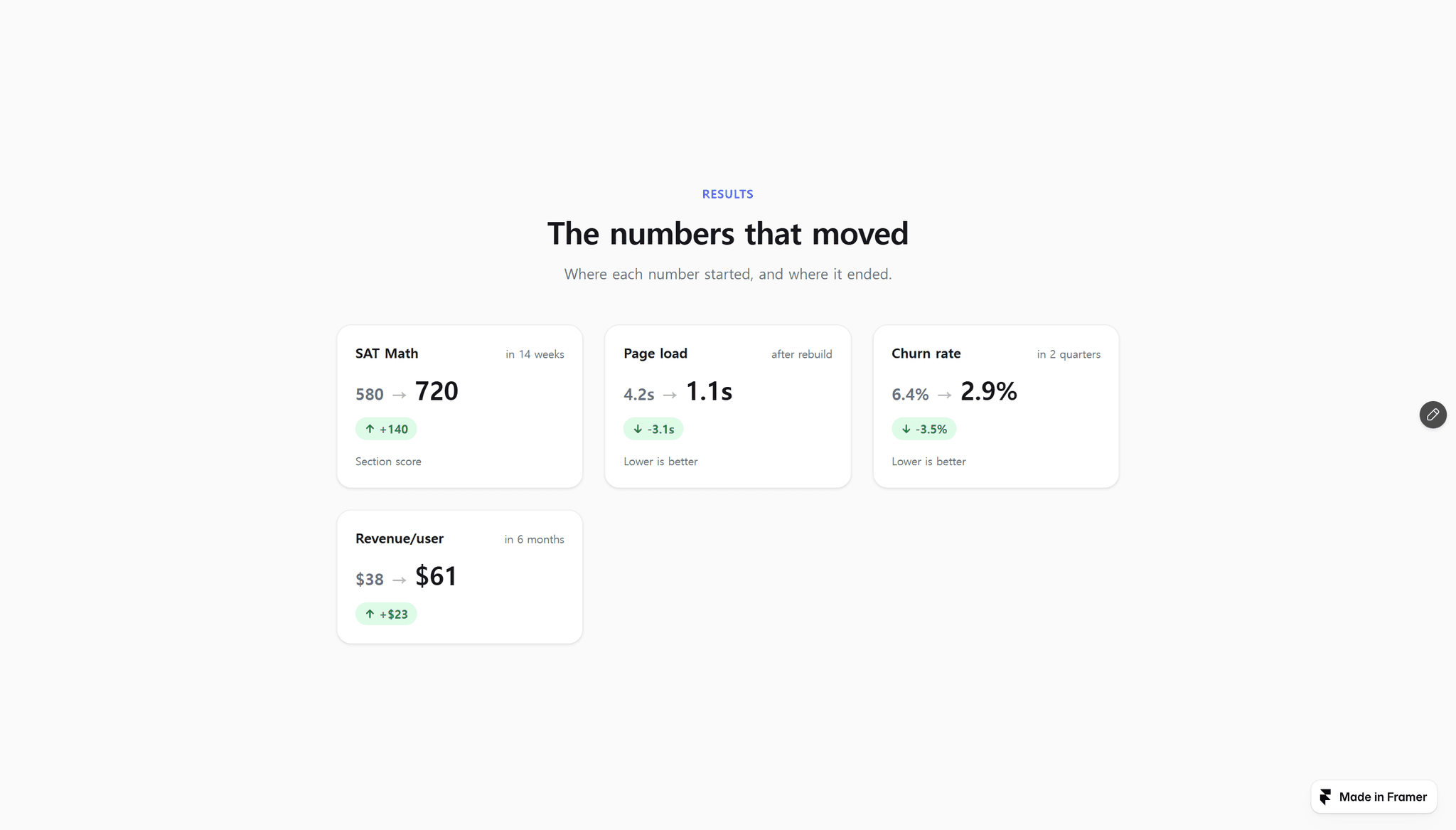
Most counter components animate one number. This one animates the change.
Each card shows where a number started, where it ended, and the gain between
them — all three counting up together when the section scrolls into view.
That is the shape of a proof block: not "1,480 students" but "1,280 → 1,480."
WHY THE GAIN CHIP STAYS GREEN
A gain is not always a bigger number. Weight, cost, churn, load time, support
tickets — in half the categories that matter, going down is the win. The chip
flips its arrow and keeps the green either way, so the same section works for
a tutor showing score lifts and an agency showing bounce rate cut in half.
WHAT YOU GET
— Two numbers per card. Type the before and the after; the gain is calculated
and animated for you.
— Counts up once, when the section scrolls into view. Static in the Framer
canvas, so your layout never jitters while you design.
— Any number of cards in a grid that reflows on its own.
— Per card: label, prefix, suffix, timeframe, and a note line — for units,
dates, or the source of the number.
— Light and dark themes, an accent color, and a section background that is
transparent by default so it drops onto your existing page.
— Section eyebrow, heading, subheading, and a footnote for disclaimers.
— Zero external libraries, zero layout shift. Pure React and CSS.
Everything is configured from the properties panel. No code, no chart
library, no CMS.